See the Whole Book at Once, Then Move It Around.
The Board shows every chapter and scene of your book as cards. Move a card and the scene moves with it. It’s for the night you discover chapter 12 belongs before chapter 3.
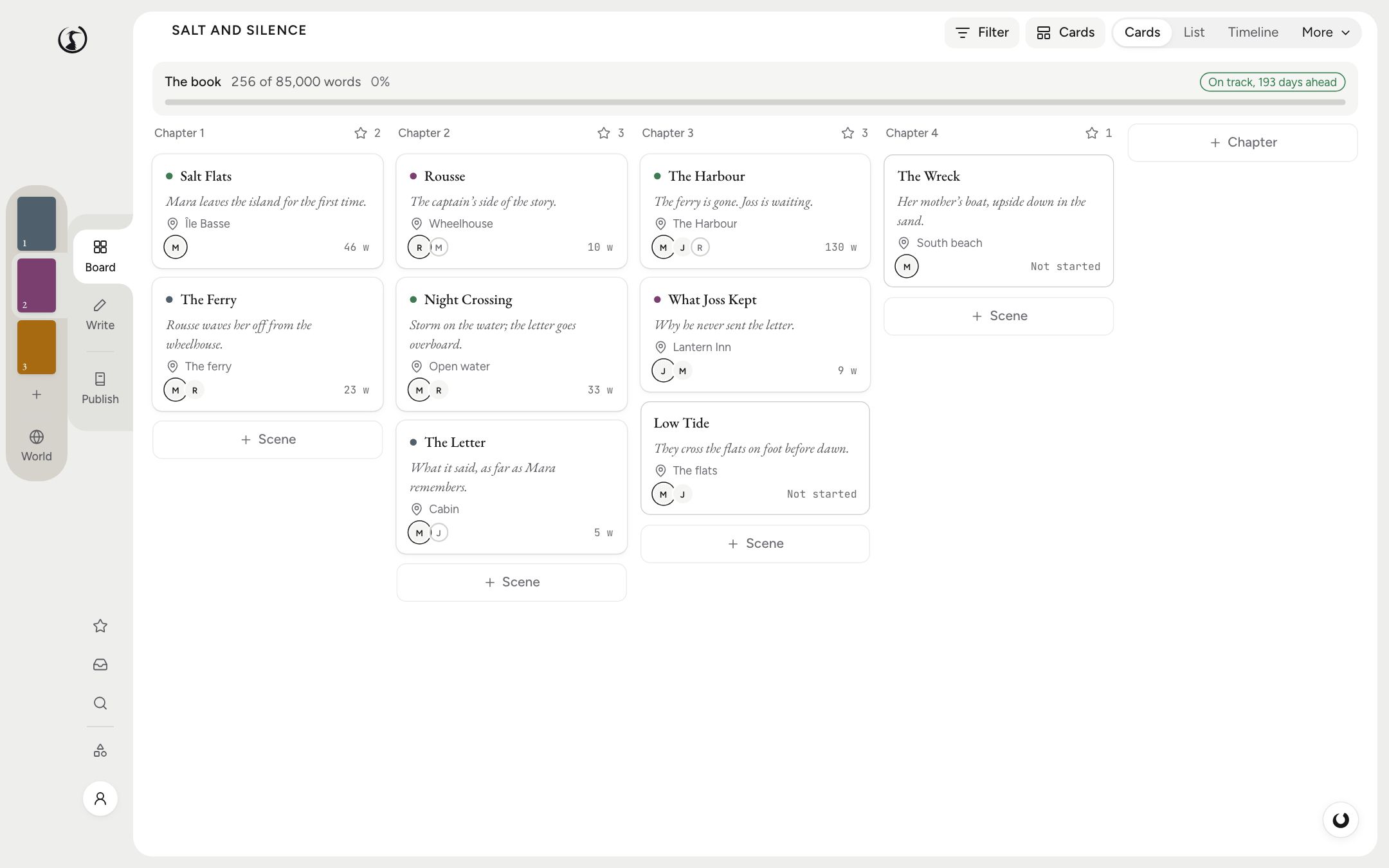
One Column per Chapter
Open the Board and you get your book as columns of index cards, a column for each chapter and a card for each scene. Each card shows what you want on it: the title, a synopsis, the location, keywords, whose point of view it is, who else is there, and how far it is from its word target.
Drag a card to another chapter and the scene moves in the manuscript. There’s no separate outline to keep in step with the book, because the cards are the book. You can also move cards from the keyboard, and merge two scenes that turned out to be one.
Five Other Ways to See It
Cards are where most people start. When a book gets complicated, the same scenes can be laid out differently.
- List puts everything in a table, with status: To do, First draft, Revised, Final.
- Timeline arranges scenes by when they happen rather than when you tell them, in lanes by point of view, plotline or series. It takes real dates, “Day 3”, or a calendar you invented.
- Grid is the plot grid: plotlines down the side, scenes along the top, beats in the cells. A row that goes empty for eighty pages is a subplot you forgot about.
- Charts and Series are there for when you need numbers, or more than one book.
For working things out with no rules at all, make a whiteboard in World: a free surface of notes, scene cards and arrows, as many as you like, each its own JSON Canvas file that Obsidian can open too. When the cards settle, commit them and the scenes take that order in the book.
Find the Scene You’re Looking For
Filter by label, status, keyword, point of view, who’s in the scene, where it happens, beat or any field you’ve added yourself. “All the scenes with Hortense in the linen room that are still first drafts” is a question the Board can answer, which is more than can be said for the folder of documents it replaces.
Labels come in six colours. Use them for whatever you like: timelines, plotlines, scenes you’re ashamed of.
Structure, If You Want It
Shiro knows Save the Cat, the Hero’s Journey, three acts, the seven-point plot, the Story Circle, 27 chapters, Romancing the Beat, Kishōtenketsu and the memoir arc, along with scene patterns like goal, conflict, outcome. Pick one and its beats appear on your cards, with where each should roughly fall. It’s a suggestion. Your book can miss every beat and Shiro won’t say a word.
The Questions People Ask
Do I have to outline before I can use it?
No. The Board fills itself in as you write, because every scene already has a card. Plenty of writers only open it once the draft has stopped making sense.
Can I use a beat sheet like Save the Cat?
Yes. Shiro ships with structures including Save the Cat, the Hero’s Journey, three acts, seven-point and Romancing the Beat. They are only ever an indication: beats show up on your cards, and nothing is created, blocked or rewritten.
Can I see my plotlines separately?
Yes. The Grid view puts plotlines in rows and scenes in columns, and the Timeline can sort its lanes by plotline or by point of view.
Does it work with the invented calendar in my fantasy novel?
Yes. The Timeline takes real dates, “Day 3”, or a calendar you made up.